Static vs Dynamic QR Codes - Which One Should You Use? Complete Guide
Admin
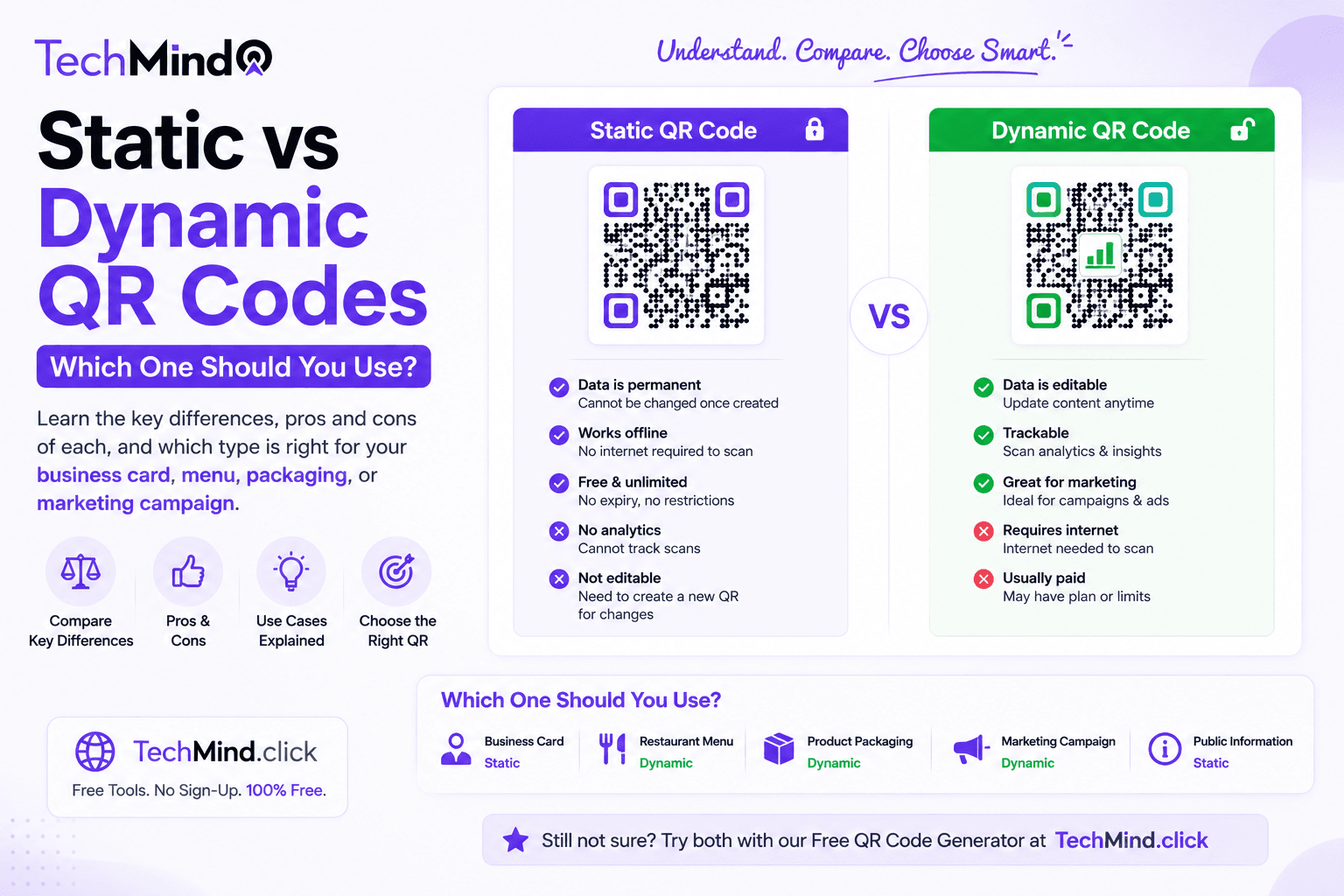
Mark Twain once said, "The difference between the almost right word and the right word is really a large matter." Choosing between a static and dynamic QR code is exactly that kind of decision - both look identical to the eye, but picking the wrong one for your use case can mean reprinting materials, losing tracking data you needed, or paying for a subscription feature you never use.
This guide breaks down the real differences, with honest recommendations for when each type makes sense.
What Is a Static QR Code?
A static QR code encodes its destination data - a URL, text, Wi-Fi credentials, or contact information - directly into the visual pattern of the code itself. Once generated, that data is permanently fixed. You cannot edit the content after the code has been created and printed.
Key characteristics of static QR codes:
- Never expire - the code works for as long as the destination remains valid
- No subscription or ongoing account required
- No dependency on a third-party server staying online
- Cannot be edited after generation - a new code must be created for any changes
- Typically denser-looking patterns since all data is embedded directly
- No built-in scan tracking or analytics
What Is a Dynamic QR Code?
A dynamic QR code does not encode your final destination directly. Instead, it encodes a short redirect link controlled by a QR code platform. When scanned, the code sends the user to that platform's server, which then redirects them to your actual destination - a URL, a landing page, or other content.
Key characteristics of dynamic QR codes:
- Editable - you can change the destination URL at any time without reprinting the code
- Scan tracking - most platforms provide analytics on number of scans, location, device type, and time
- Dependent on the platform - if the service shuts down or your subscription lapses, the code stops working even though it looks unchanged
- Usually requires an account, and advanced features often sit behind a paid tier
- Often appears as a slightly simpler visual pattern since it only encodes a short redirect link
Static vs Dynamic - Side-by-Side Comparison
| Feature | Static QR Code | Dynamic QR Code |
|---|---|---|
| Expiration | Never expires | Depends on platform staying active |
| Editable after printing | No | Yes |
| Account required | No | Usually yes |
| Scan tracking/analytics | No | Yes (on most platforms) |
| Cost | Free, permanently | Often free tier limited, paid for full features |
| Privacy | No third-party redirect | Routes through platform server |
| Best for | One-time use, permanent content, print materials | Evolving campaigns, marketing tracking |
When Should You Use a Static QR Code?
As Steve Jobs said, "Simplicity is the ultimate sophistication." For the vast majority of personal and small business needs, static is the simpler and more sustainable choice:
Business cards: Your contact details rarely change frequently enough to need a dynamic redirect. A static vCard QR code works permanently and privately.
Wi-Fi sharing: A Wi-Fi password QR code for your home or office needs no tracking and no editability - just a permanent, working code.
Product packaging with stable links: If your packaging links to a page that itself can be updated (like a product page you control), you do not need a dynamic QR code - the destination page can change even though the QR code stays the same.
One-time events: A QR code for a single event, printed once and used once, has no need for ongoing editability after the event has passed.
Privacy-conscious use cases: Since static codes encode the destination directly with no third-party redirect server in between, they are the better choice when privacy matters - there is no platform logging who scanned your code and when.
When Might You Need a Dynamic QR Code?
Dynamic QR codes earn their complexity in specific scenarios:
Marketing campaigns measuring ROI: If you need to know exactly how many people scanned a code on a billboard versus a flyer, dynamic tracking provides that data.
Print materials with a long shelf life and changing destinations: A large quantity of printed materials - like thousands of product units - where the link might need to change after printing (a discontinued promotion, an updated landing page) benefits from dynamic editability.
A/B testing destinations: Some dynamic platforms allow testing different destination pages without changing the physical code, useful for marketing experimentation.
As APJ Abdul Kalam said, "Excellence is a continuous process and not an accident." If your use case genuinely requires ongoing measurement and editability, that complexity is earned. But many people choose dynamic QR codes by default without needing any of these features - paying with an account, a subscription, or third-party data routing for capabilities they never use.
The Honest Recommendation
For business cards, Wi-Fi sharing, contact information, one-time events, and most small business or personal needs - a free static QR code generator like TechMind.click is simpler, more private, costs nothing ever, and never depends on a third-party platform staying in business.
Save dynamic QR codes for genuine marketing campaigns where scan tracking and post-print editability are requirements you will actually use - not features you might use someday.
Frequently Asked Questions
Q: Can I tell if a QR code is static or dynamic just by looking at it?
Not reliably by sight alone, though dynamic codes sometimes appear visually simpler since they only encode a short redirect URL, while static codes encoding longer content (like full contact details) often look denser. The safest way to know is to check the generator you used - if you created an account and can edit the destination later, it is dynamic.
Q: Do static QR codes really never expire?
The QR code pattern itself never expires or stops scanning. However, if your static code encodes a URL and that website is later taken down, the code will still scan successfully but lead to a dead page. The code's function - directing to whatever it encodes - is permanent; the destination's availability depends on you maintaining it.
Q: Is a free static QR code generator safe to use?
Yes, provided the generator processes everything client-side and does not route your data through a tracking server. TechMind.click's QR Code Generator works entirely in your browser - your encoded data is never transmitted to or stored on any external server.
Q: Can I add a logo to a static QR code?
Yes. Logo embedding and colour customisation are independent of whether a QR code is static or dynamic. TechMind.click's static QR code generator supports both custom colours and logo embedding.
Final Thoughts
As Mahatma Gandhi said, "In a gentle way, you can shake the world." Choosing the right QR code type - simply, without overcomplicating a decision that usually has an obvious answer - is exactly that kind of small, gentle choice with lasting impact.
For most people and most use cases, free and permanent beats paid and trackable. Generate your free static QR code at TechMind.click - no sign-up, no expiration, no watermark.