Free QR Code Generator Online - Create Custom QR Codes Instantly, No Sign-Up
Admin
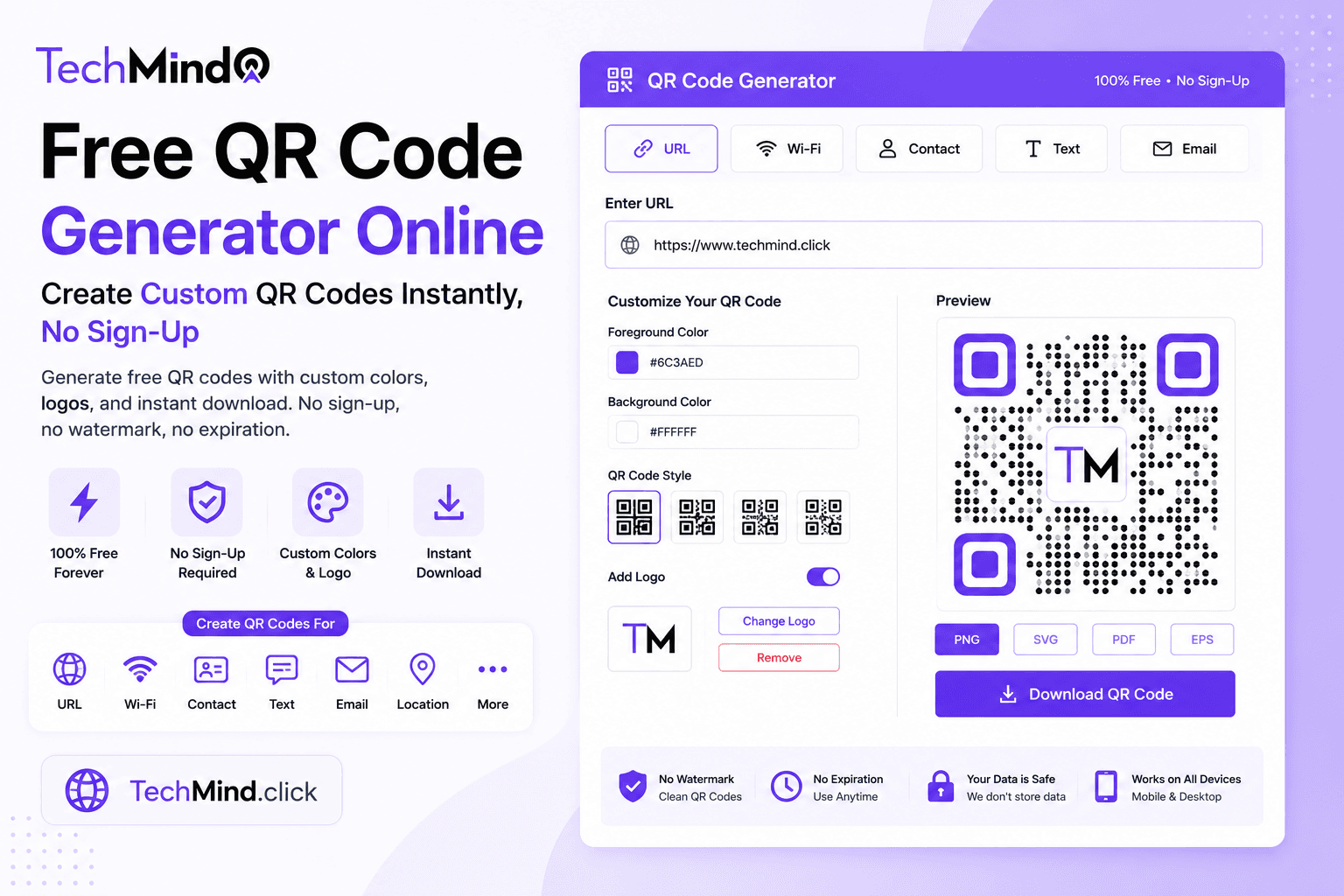
Steve Jobs once said, "Innovation is saying no to a thousand things." A QR code does exactly that - it says no to typing out a long URL, no to manually entering Wi-Fi passwords, no to saving a contact one field at a time. One scan replaces all of it. TechMind.click's new QR Code Generator brings this convenience to everyone, completely free, with full customisation, and without a single sign-up form standing in the way.
What Is a QR Code and Why Does It Matter in 2026?
A QR code (Quick Response code) is a two-dimensional barcode that stores data - a website URL, a piece of text, Wi-Fi credentials, or contact information - in a pattern of black and white squares that any smartphone camera can read instantly. Unlike a traditional barcode, which stores data in a single line and holds limited information, a QR code stores data in two dimensions and can hold significantly more.
QR codes were originally created in 1994 to track vehicle parts during manufacturing. They have since become one of the most universal tools for bridging physical and digital experiences - found on restaurant tables, product packaging, business cards, event tickets, posters, and storefronts everywhere.
As Albert Einstein observed, "If you can't explain it simply, you don't understand it well enough." Here is the simple version: point your phone camera at a QR code, and your phone instantly does whatever the code was built to do - open a website, save a contact, join a Wi-Fi network, or display a message. No typing, no app required on modern phones.
Introducing the TechMind.click QR Code Generator
TechMind.click now includes a completely free QR Code Generator alongside its existing 25-plus text formatting tools. Like every other tool on the platform, it requires no account, has no usage limit, and processes everything directly in your browser - meaning the data you encode never touches an external server.
What you can generate QR codes for:
- Website URLs - direct visitors straight to your site, blog post, or landing page
- Plain text - display a message, instructions, or any short text content
- Wi-Fi credentials - let guests connect to your network with one scan instead of typing a password
- Contact information (vCard) - share your name, phone, and email so recipients can save you as a contact instantly
- Email addresses - open a pre-filled email compose window when scanned
- Phone numbers - start a call directly from a scan
Custom QR Codes - Branding That Actually Gets Scanned
Industry research consistently shows that branded QR codes get significantly more scans than plain black-and-white codes - users trust and engage with codes that look intentional and professional rather than generic. TechMind.click's QR Code Generator supports full customisation:
Custom colours: Match your QR code to your brand palette instead of settling for default black and white. Choose foreground and background colours that align with your website, business card, or marketing material.
Logo embedding: Add your logo to the centre of the QR code for instant brand recognition. A well-placed logo does not interfere with scannability when sized correctly, and it immediately signals to users that the code is legitimate and belongs to a real brand - not a random or potentially unsafe link.
High-resolution downloads: Download your QR code in high resolution suitable for both digital use and professional printing - business cards, posters, packaging, and signage all require crisp, high-DPI output to remain scannable at any size.
Is TechMind.click's QR Code Generator Safe?
Safety is one of the most searched questions around QR code generators - and for good reason. A poorly built or malicious QR tool can redirect scans through tracking servers, inject unwanted redirects, or harvest the data you encode. As Warren Buffett said, "It takes 20 years to build a reputation and five minutes to ruin it." Trust in a tool matters as much as its features.
TechMind.click's QR Code Generator is built on the same privacy-first principle as every other tool on the platform:
- No server processing - the QR code is generated directly in your browser using client-side code. The data you enter never gets transmitted to or stored on any server.
- No tracking or redirects - the QR code encodes exactly what you type. There are no link shorteners, no third-party redirect layers, and no hidden tracking parameters added to your URL.
- No account required - there is no database storing your generated codes, your email, or your usage history because there is no sign-up at all.
- No watermark - many free QR tools quietly add their own logo or branding to your code. TechMind.click never does this. The QR code you generate is entirely yours.
Static QR Codes - What TechMind.click Generates and Why It Matters
There are two broad categories of QR codes: static and dynamic. Understanding the difference helps you choose the right tool for your specific need.
Static QR codes encode the destination data directly into the code pattern itself. Once generated, the content cannot be changed - but this also means the code never expires, requires no ongoing subscription, and has no dependency on a third-party server staying online. TechMind.click generates static QR codes, which is exactly what most individual and small business use cases need: a code for a business card, a flyer, a product label, or a one-time event.
Dynamic QR codes point to a short link controlled by a platform, which then redirects to your actual destination. This allows the destination to be changed after printing, and often includes scan analytics. The trade-off is that dynamic codes typically require an account, often involve a subscription after a free tier, and depend on the platform's redirect service remaining active - if the service shuts down, the QR code stops working entirely, even though the physical code looks identical.
For the vast majority of personal and small business needs - sharing a link, displaying Wi-Fi details, putting a contact card on a flyer - a static QR code from TechMind.click is the simpler, more permanent, and more private choice.
How to Generate a QR Code Using TechMind.click
APJ Abdul Kalam said, "Excellence is a continuous process and not an accident." A clean, reliable QR code generation process reflects exactly that kind of careful design. Here is how it works:
- Go to TechMind.click - Navigate to the QR Code Generator tool, available directly from the homepage tools menu.
- Choose your QR code type - Select URL, Text, Wi-Fi, vCard (contact), Email, or Phone depending on what you want the scan to do.
- Enter your content - Type your URL, message, Wi-Fi network name and password, or contact details into the relevant fields.
- Customise the design - Choose your foreground and background colours, and upload a logo if you want branded recognition.
- Generate and download - Your QR code appears instantly. Download it in high resolution as a PNG or SVG file, ready for digital use or print.
Real-World Use Cases for QR Codes
Restaurants and cafes: Display your menu as a QR code on each table. Customers scan and view your menu instantly on their own phone - no shared physical menus, no reprinting when prices change if you link to an editable page, and no app download required for the customer.
Business cards: Add a QR code to your business card that saves your full contact details - name, phone, email - directly to the recipient's phone contacts with a single scan, eliminating manual data entry errors.
Wi-Fi access for guests: Print a QR code containing your Wi-Fi network name and password and place it where guests can see it - at home, in a guesthouse, in a waiting room, or at an event. Guests connect with one scan instead of asking for and typing a complicated password.
Product packaging: Link directly to product usage instructions, warranty registration, or your online store from physical packaging - giving customers an instant digital touchpoint connected to a physical product.
Event posters and flyers: Place a QR code on event posters linking directly to a registration page, ticket purchase link, or event details - converting a passive print advertisement into an instant digital action.
Resumes and portfolios: Add a QR code to your printed resume linking to your online portfolio, LinkedIn profile, or personal website - giving recruiters instant access to more detail than a printed page can hold.
QR Code Design Best Practices for Maximum Scannability
Mahatma Gandhi said, "In a gentle way, you can shake the world." A well-designed QR code is a gentle nudge that drives real action - but only if it scans reliably. Follow these guidelines:
- Maintain sufficient contrast - Dark foreground colours against light backgrounds scan most reliably. Avoid colour combinations with low contrast, such as light grey on white.
- Keep logos small and centred - A logo should occupy no more than roughly 20-25% of the QR code area, placed centrally, to avoid interfering with the scanning pattern.
- Print at adequate size - For table cards and small print, a minimum of 3x3 cm (roughly 1.2x1.2 inches) ensures reliable scanning at typical phone-to-code distances.
- Test before mass printing - Always scan your QR code with multiple phone models before committing to large print runs, especially if you have added custom colours or a logo.
- Leave white space around the code - A small margin (called the "quiet zone") around the QR code pattern helps scanners distinguish the code from surrounding content.
Frequently Asked Questions
Q: Do TechMind.click's QR codes expire?
No. TechMind.click generates static QR codes, which encode your content directly into the code pattern. Static QR codes never expire and do not depend on any external server staying online - once generated and downloaded, the code works indefinitely as long as the destination URL (if applicable) remains valid.
Q: Is there a watermark on the QR codes I generate?
No. TechMind.click never adds its own logo, branding, or watermark to your QR code. The code you generate and download is entirely yours to use for personal or commercial purposes.
Q: Can I add my own logo to the QR code?
Yes. TechMind.click's QR Code Generator supports logo embedding. Upload your logo image and it will be placed in the centre of the QR code, sized appropriately to maintain scannability.
Q: Do I need to create an account to use the QR code generator?
No. There is no sign-up, no email requirement, and no account of any kind needed. Open TechMind.click, generate your QR code, and download it immediately.
Q: What is the difference between a static and dynamic QR code, and which does TechMind.click offer?
A static QR code encodes its destination data permanently within the code and never expires, but the content cannot be edited after generation. A dynamic QR code points to an editable redirect link, allowing the destination to change later, but typically requires an account and ongoing platform dependency. TechMind.click generates static QR codes - the most reliable, private, and permanent option for the vast majority of personal and small business use cases.
Q: Can I generate a QR code for Wi-Fi sharing?
Yes. Select the Wi-Fi QR code type, enter your network name (SSID) and password, and TechMind.click generates a code that, when scanned, allows the user's phone to connect automatically without typing the password manually.
Q: What file format should I download my QR code in?
For digital use - websites, social media, digital documents - PNG is sufficient and widely compatible. For professional printing - business cards, large posters, packaging - download in SVG format, which is a vector format that scales to any size without losing quality or sharpness.
Final Thoughts
As Winston Churchill said, "Success is not final, failure is not fatal: it is the courage to continue that counts." Adding a QR code to your business card, your menu, or your packaging is a small, low-effort action that creates a continuous bridge between the physical and digital versions of whatever you are sharing.
TechMind.click's QR Code Generator brings this capability to everyone - free, private, customisable, and permanent. No sign-up, no watermark, no expiration.
Try the free QR Code Generator now at TechMind.click - alongside the case converter, slug generator, word counter, and the rest of the toolkit, all in one place.