Social Media QR Code Generator - Free Instagram, Facebook, YouTube, WhatsApp QR Codes
Admin
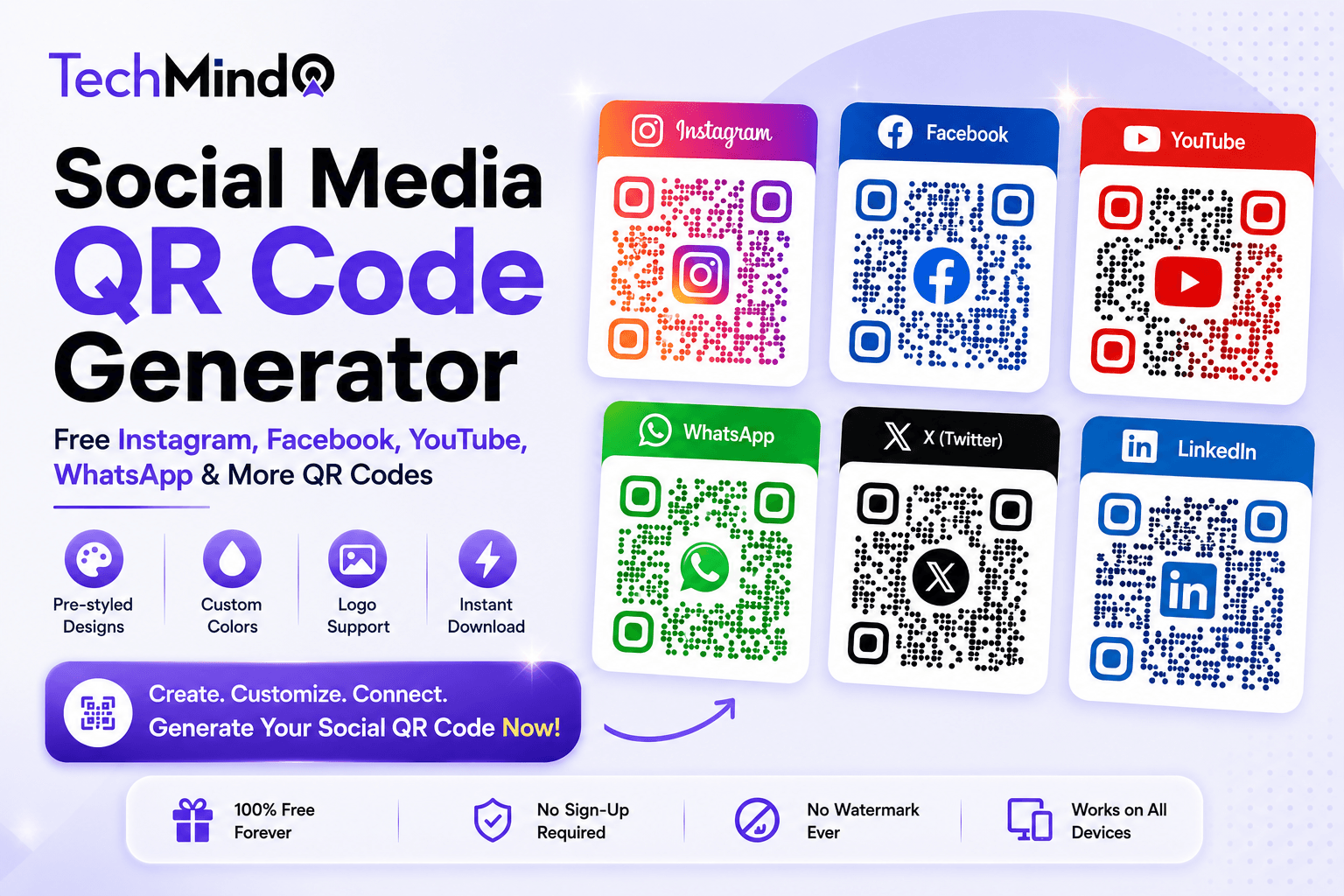
Steve Jobs once said, "Design is not just what it looks like and feels like. Design is how it works." A QR code on a business card that links to an Instagram profile should look like it belongs to Instagram - not like a generic black-and-white matrix that forces the viewer to trust it blindly. TechMind.click's QR Code Generator now includes pre-styled Social Media QR Codes for every major platform, making it effortless to create branded, recognisable QR codes that people actually feel confident scanning.
What Are Social Media QR Codes?
Social Media QR Codes are platform-specific QR codes pre-designed to visually match the brand identity of each social media platform. Instead of generating a plain black-and-white QR code and hoping people understand where it leads, a Social Media QR Code communicates its destination instantly - the platform's colour palette, logo reference, and visual style all signal to the viewer before they even scan.
TechMind.click now generates pre-styled Social Media QR Codes for six major platforms:
- Instagram - gradient-styled design matching Instagram's visual identity
- Facebook - Facebook blue palette, instantly recognisable
- YouTube - YouTube red, perfect for channel promotion
- Twitter / X - clean, minimal design for profile sharing
- LinkedIn - professional blue, ideal for business cards and networking materials
- WhatsApp - WhatsApp green, perfect for group links and business contact sharing
The process is simple: select your platform, paste your profile URL or group link, and your platform-styled QR code is generated instantly. Custom colours and logo support are still fully available on top of the platform base style.
Why Platform-Specific Design Increases Scan Rates
As Warren Buffett said, "It takes 20 years to build a reputation and five minutes to ruin it." A QR code that looks unbranded and anonymous can damage that reputation at a glance - or simply go unscanned because people do not trust where it leads.
Research consistently shows that branded QR codes receive significantly more scans than plain ones. The reason is straightforward: visual context removes uncertainty. When someone sees a QR code in Instagram's gradient colours on a flyer, they know immediately what will happen when they scan it. That confidence drives action in a way that a plain black-and-white code simply cannot.
For content creators, small business owners, and marketers who print QR codes on physical materials - business cards, menus, posters, packaging, or event banners - this visual pre-recognition is the difference between a QR code that gets scanned and one that gets ignored.
How to Create a Social Media QR Code on TechMind.click
APJ Abdul Kalam said, "Excellence is a continuous process and not an accident." Creating a professional social media QR code should take under a minute. Here is the exact process:
- Go to TechMind.click QR Code Generator - Navigate directly to the QR tool at techmind.click/qr-code-generator.
- Select Social Media as your QR type - Choose the Social Media option from the QR type selector.
- Pick your platform - Select Instagram, Facebook, YouTube, Twitter/X, LinkedIn, or WhatsApp from the platform list. The design preview updates instantly.
- Paste your profile URL or link - Enter your social media profile URL, page link, YouTube channel link, or WhatsApp group invite link.
- Customise if needed - Adjust colours, add your logo to the centre, or keep the platform's default styling.
- Download - Export as PNG for digital use, SVG for professional printing, or PDF for direct print-ready output.
Use Cases - Where Social Media QR Codes Work Best
Business cards: Adding an Instagram or LinkedIn QR code to your business card gives recipients a one-scan path to your social profile. Instead of hoping they remember to search for you later, the QR code creates an immediate connection at the moment of exchange. A LinkedIn QR code in professional blue on the back of a business card is particularly effective at networking events and conferences.
Restaurant tables and menus: A WhatsApp QR code on a table card lets customers join a loyalty group, receive offers, or reach customer support with one scan. A Facebook QR code links directly to your restaurant's page for reviews, events, and updates - without the customer needing to search for your business name.
Event banners and flyers: YouTube QR codes on event posters let attendees subscribe to a channel covering the event or follow the organiser. Instagram QR codes on concert flyers drive real-time Instagram follows from people physically at the event - the highest-intent audience you can reach.
Product packaging: A YouTube QR code on product packaging linking to tutorial or review videos adds genuine value for customers while building channel subscribers from buyers who are already invested in the product. Instagram QR codes on packaging drive user-generated content when paired with a call to action like "share your unboxing and tag us."
In-store signage and receipts: A Facebook QR code near checkout encourages customers to leave reviews or follow the business page at the moment when the transaction is complete - the most likely moment for positive engagement. WhatsApp QR codes on receipts let customers opt into customer service communication directly.
Digital content: Social Media QR codes are not limited to print. Use them in presentations, in the corner of YouTube thumbnails, in email signatures, or as part of digital newsletters to drive cross-platform follows. An Instagram QR code in a LinkedIn newsletter, for example, drives LinkedIn readers to your Instagram content efficiently.
Platform-by-Platform Guide
As Albert Einstein observed, "If you can't explain it simply, you don't understand it well enough." Here is the simple guide for each platform:
Instagram QR Code: Use your Instagram profile URL (instagram.com/yourusername) or a specific post or reel link. Best for business cards, packaging, event flyers, and any print material targeting a social-first audience. Instagram QR codes in gradient pink-purple drive higher scan trust than plain codes for this demographic.
Facebook QR Code: Use your Facebook Page URL (facebook.com/yourpagename) or a Facebook Group link. Best for local businesses, restaurants, community groups, and service providers whose customers are primarily on Facebook. Facebook blue is one of the most recognisable brand colours globally.
YouTube QR Code: Use your YouTube channel URL or a specific video link. Best for creators, educators, and product brands that use video tutorials or reviews. A YouTube QR code on physical merchandise or product packaging is a particularly high-value placement.
Twitter / X QR Code: Use your Twitter/X profile URL. Best for journalists, commentators, brands with active community discussions, and tech or business audiences where Twitter/X remains the primary real-time platform.
LinkedIn QR Code: Use your LinkedIn profile URL or company page URL. Best for business cards, CV and resume prints, conference materials, and any professional networking context. LinkedIn QR codes in professional blue signal seriousness and are highly appropriate for B2B contexts. For creating polished professional print materials, also see our free text formatting tools guide.
WhatsApp QR Code: Use your WhatsApp business link (wa.me/yourphonenumber) or a WhatsApp group invite link. Best for customer service, loyalty programmes, local businesses, and any context where direct messaging is the preferred communication channel. WhatsApp QR codes in the platform's signature green are particularly effective in India and other markets where WhatsApp is the primary messaging platform.
Privacy and Safety - How TechMind.click Handles Your Social Media Links
Mahatma Gandhi said, "In a gentle way, you can shake the world." The gentlest - and most trustworthy - approach to handling user data is not to handle it at all. TechMind.click's QR Code Generator operates on this principle:
- Your social media URL is never transmitted to any server - it is processed entirely within your browser
- There are no redirect layers or tracking parameters added to your links - the QR code encodes your exact URL, nothing more
- No account is created and no URL is stored - once you close the tab, nothing is retained
- The generated QR code is a static code - it never expires and has no dependency on TechMind.click's infrastructure remaining operational
Frequently Asked Questions
Q: Can I create a QR code for my Instagram profile for free?
Yes. TechMind.click's Social Media QR Code Generator creates Instagram QR codes completely free. Select Instagram as the platform, paste your profile URL (instagram.com/yourusername), customise if needed, and download. No sign-up, no watermark, no expiration.
Q: What URL should I use for a WhatsApp QR code?
For a personal WhatsApp contact: use wa.me/yourcountrycodephonenumber (example: wa.me/919876543210 for an Indian number). For a WhatsApp Business account: use your WhatsApp Business link. For a WhatsApp group: use the group's invite link (available from Group Info in WhatsApp).
Q: Can I use these social media QR codes for commercial printing?
Yes. Download in SVG format for commercial printing - SVG is a vector format that scales to any size without losing quality. TechMind.click adds no watermark and places no restrictions on how you use the downloaded QR code.
Q: Do social media QR codes expire?
No. TechMind.click generates static QR codes, which encode the URL directly into the code pattern. Static codes never expire. As long as your social media profile remains at the same URL, the QR code works indefinitely.
Q: Can I add my own logo to a social media QR code?
Yes. After selecting your platform and entering your URL, use the logo upload option to place your logo in the centre of the QR code. The platform styling and your logo can be combined for a fully branded result.
Q: Which social media platforms does TechMind.click support?
Currently: Instagram, Facebook, YouTube, Twitter/X, LinkedIn, and WhatsApp. Each has a distinct pre-styled design that visually matches the platform's brand identity.
Final Thoughts
As Winston Churchill said, "Success is not final, failure is not fatal: it is the courage to continue that counts." Growing a social media following is a continuous effort - every touchpoint that converts a physical interaction into a digital follow is a small but meaningful step in that direction.
A well-designed social media QR code on a business card, a packaging insert, or a poster converts those physical moments into digital connections efficiently and professionally. TechMind.click makes this free, immediate, and private.
Create your free Social Media QR Code now at TechMind.click QR Code Generator - Instagram, Facebook, YouTube, Twitter/X, LinkedIn, or WhatsApp, ready in seconds.